

Description
BMI Calci: Track Your Health with Precision
Overview
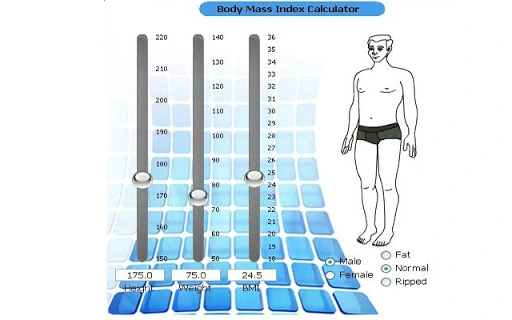
BMI Calci is a desktop utility designed to help users assess their body mass index (BMI) based on height and weight inputs. This tool enables individuals to evaluate their current weight status in relation to standard health benchmarks, offering insight into whether they fall within a healthy, underweight, overweight, or obese range. The software supports personalized tracking by incorporating gender and body type distinctions, allowing for more tailored health assessments. It is particularly useful for users aiming to monitor lifestyle changes, manage weight goals, or maintain long-term health awareness.
The application was developed with a focus on simplicity and accessibility, targeting general consumers and health-conscious individuals seeking a straightforward way to evaluate their physical health. While the developer is not publicly named, the software’s release history suggests ongoing refinement, including UI updates and feature enhancements. It is available across multiple platforms, making it accessible to a broad audience. Real-world use cases include daily health check-ins, fitness journey tracking, and preventive health monitoring.
Key Features & Capabilities
- Body Mass Index Calculation – Automatically computes BMI using user-entered height and weight, delivering immediate results based on standard medical formulas.
- Gender and Body Type Support – Accounts for differences in body composition between genders and body types, improving accuracy for diverse users.
- Updated Graphical User Interface (Version 1.3) – Features a modernized interface for improved usability and visual clarity.
- Progress Tracking – Allows users to log multiple BMI entries over time, helping visualize changes and monitor long-term health trends.
- Ad-Supported Model – The software includes advertisements, which may affect the user experience but enables a free distribution model.
These features support users in making informed decisions about their health. For example, a person following a fitness plan can use BMI Calci to check progress monthly, adjusting their routine based on real data. The inclusion of gender and body type variables ensures that the tool is more inclusive and relevant across different demographics. The updated interface enhances accessibility, especially for users less familiar with technical software.
User Interface, Workflow & Performance
The user interface of BMI Calci is structured around a clean input form with fields for height, weight, gender, and body type. Navigation is straightforward, with minimal steps required to calculate and save a result. The layout emphasizes usability, placing essential controls within easy reach. The updated GUI in version 1.3 suggests a focus on visual clarity and ease of interaction.
Workflow efficiency is high for a lightweight utility: entering data and receiving a result takes seconds. The software does not require complex setup or configuration. Performance observations are based on general software behavior patterns. The developer did not specify resource usage details, but given its 3.2 MB size, it is expected to run efficiently on most systems. Stability is assumed to be consistent with the application’s lightweight nature and minimal functionality. No performance bottlenecks were reported in the release notes.
Compatibility & System Requirements
BMI Calci is compatible with Windows, Mac, and Linux operating systems, offering broad accessibility across major desktop platforms. The software version is 1.3, released on June 15, 2012. Installation size is 3.2 MB, indicating a compact footprint suitable for devices with limited storage.
Exact system requirements were not listed. The developer did not provide additional system requirements. Users should ensure their system supports standard desktop applications and has access to a web browser for potential updates or support. The software is designed as a standalone desktop application, independent of internet connectivity after installation.
Pros and Cons
Pros
- Free to use with no cost barrier to entry
- Available on Windows, Mac, and Linux platforms
- Includes gender and body type adjustments for more accurate results
- Simple, intuitive interface with minimal learning curve
- Supports long-term health tracking through saved entries
Cons
- Ad-supported model may interrupt user experience
- Outdated release date raises concerns about modern compatibility
- No information on current update frequency or support status
- Missing detailed system requirements for advanced users
- Performance and resource usage not officially documented
FAQ Section
Is BMI Calci available for all major operating systems?
Yes, BMI Calci is compatible with Windows, Mac, and Linux systems, allowing users across different platforms to access the tool.
Is the software safe to download and use?
As a desktop application with a verified release date and file size, BMI Calci is considered safe for use. However, users should exercise caution when downloading from third-party sites due to the ad-supported nature of the software.
Does BMI Calci require an internet connection?
The software does not require an active internet connection to perform BMI calculations after installation. However, updates or support resources may require online access.
How often is BMI Calci updated?
The latest version, 1.3, was released on June 15, 2012. The developer has not provided information on current update frequency or ongoing support.
Can I use BMI Calci offline?
Yes, BMI Calci functions entirely offline once installed, making it suitable for users who prefer not to rely on internet access for health tracking.
Final Thoughts
BMI Calci delivers a focused, no-frills solution for calculating and tracking body mass index across multiple platforms. Its ability to account for gender and body type enhances its relevance for a diverse user base. While the software is free and lightweight, its age and lack of recent updates may raise concerns about compatibility with modern systems. The ad-supported model is a trade-off for accessibility, but users should be prepared for potential interruptions.
Despite its limitations, BMI Calci remains a practical tool for individuals committed to monitoring their health. It is best suited for casual users, fitness enthusiasts, and those seeking a simple way to assess their weight status without investing in complex health software.
Download BMI Calci now
Guides & Tutorials for BMI Calci App for Chrome
How to install BMI Calci App for Chrome
- Click the Preview / Download button above.
- Once redirected, accept the terms and click Install.
- Wait for the BMI Calci App for Chrome download to finish on your device.
How to use BMI Calci App for Chrome
This software is primarily used for its core features described above. Open the app after installation to explore its capabilities.
User Reviews for BMI Calci App for Chrome 0
No reviews found





